
Find the best app to learn Korean: start speaking with Teuida, then add apps for Hangul, vocabulary, grammar and listening. Free plans compared, Oct 2026.
Most people who learn Korean with apps can read a little and tap the right answers, then freeze the first time someone talks to them. When we looked for the best app to learn Korean, that gap decided the order of this guide. Speaking comes first, because it is the skill most apps leave out, and for that we recommend Teuida, the app made by the team behind this blog. For reading Hangul, vocabulary, grammar, and listening, we picked other apps that fill in what Teuida does not focus on, and we say plainly what each one does and does not include.
Quick picks
All plans and features below were checked on October 31, 2026.
| Goal | App | Free plan | Paid plan |
|---|---|---|---|
| Speaking out loud (start here) | Teuida (our app) | Free to use, with limits | Subscription for full access |
| Reading Hangul | Duolingo | Every course is free, with ads and an energy limit | Super removes ads and the energy limit; 14-day free trial |
| Vocabulary | Drops | All words, 5 minutes a day | Premium removes the time limit |
| Grammar | Talk To Me In Korean | First lesson free | Subscription to all lessons; 7-day free trial |
| Listening and immersion | Lingopie | No free plan | Subscription; 7-day free trial, card required |
| One structured course | LingoDeer | Limited | Subscription for all courses and features |
Prices change often and differ by region, so we have left them out. Check the app's official site or store listing for the price where you live.
How we chose the best app to learn Korean for each goal
We looked at five things for each app:
- Speaking practice. Whether the app has you say Korean out loud, and whether it gives you any feedback when you do.
- Korean-specific content. Some apps run one course design for every language. We favored apps built only for Korean, or with a Korean course that teaches Hangul.
- Free plan limits. How much you can learn before the app asks you to pay.
- Free trial. Whether you can try the full app before paying.
- Offline use. Whether you can download lessons for a commute or a flight.
Every feature listed here is stated on the app's official page or store listing as of October 31, 2026, and apps change often. Teuida is our app, so we have kept its section to what the app actually does and described the other apps from their own official pages.
Start with speaking: Teuida
Many apps teach mostly through tapping answers. You can finish hundreds of lessons that way and still freeze when someone asks you a question, because tapping and speaking use different skills.
Teuida is built around speaking. The Korean course is split into units by topic, such as Basic Greetings, and each unit is laid out day by day. A day mixes a few short expression lessons, like 안녕하세요 / 감사합니다 ("hello / thank you") or 이름이 뭐예요? ("what is your name?"), with practice and a review quiz, so you always know what to do today. Expression lessons are first-person videos: a tutor talks to you directly and explains a phrase piece by piece. You repeat each line out loud, with Hangul on screen and romanization as a guide. Each time you say a line, you get a grade for how accurately you said it the way the tutor taught, and at the end of the lesson you can review the grades for all your lines together.

Real tutors write and act the lessons, which are filmed in real places, so the lines sound like the way people actually talk. None of the lesson content is AI-generated. Teuida runs on iOS and Android, and it also runs in a web browser, so you can practice on a laptop without installing anything. In the web app, English speakers can learn Korean, Japanese, Spanish, or French, Japanese and Spanish speakers can learn Korean, and Korean speakers can learn English. As of October 31, 2026, Teuida has over 1 million downloads on Google Play and a 4.9 rating from more than 59,000 ratings on the US App Store.
- Best for: beginners who want to say real sentences from the first lesson
- Free plan: you can use it for free, with limits. A subscription gives full access.
- Pair it with: the apps below for reading Hangul, vocabulary, grammar, and listening
If you are comparing it with an app you already use, we wrote side-by-side posts on Teuida vs Duolingo, Teuida vs LingoDeer, and Teuida vs Rosetta Stone.
Other speaking options:
- Pimsleur is audio-first: you listen and answer out loud, which works well while driving. Lessons work offline. Its All Access subscription covers Korean plus 50 other languages, and there is a free trial.
- Rosetta Stone includes a speech tool called TruAccent that gives feedback on your pronunciation. It is sold as a monthly or yearly subscription.
Best app for reading Hangul: Duolingo
Hangul (한글, hangeul, "the Korean alphabet") has 24 basic letters, 14 consonants and 10 vowels, and the sounds follow regular rules, so it is usually the quickest part of Korean to learn. Duolingo is a good place to learn it because its Korean course is free and has a dedicated Hangul tab, marked 한, where you practice letters and sounds separately from the main lessons.
- Best for: absolute beginners who want short daily practice with letters and first words
- Free plan: every course is free. The free plan shows ads and uses energy, which drains as you do lessons and refills over about a day. You can earn some back by watching an ad.
- Paid: Super removes ads and gives unlimited energy, with a 14-day free trial.
- With Teuida: once you can read Hangul, you can follow the Hangul on screen in Teuida lessons instead of leaning on the romanization.
Alternative: Drops also teaches Hangul inside its Korean vocabulary app. If you prefer to learn the letters from an article first, our Hangul alphabet guide for beginners explains why each letter has the shape it does, which makes them easier to remember.
Best app for vocabulary: Drops
Drops teaches words with pictures and quick swipe games. Its Korean app covers more than 2,700 words in over 150 topics, and all of them are available on the free plan. Free users are limited to 5 minutes a day.
- Best for: building a base of everyday nouns and verbs, like 물 (mul, "water") and 먹다 (meokda, "to eat")
- Free plan: all words, 5 minutes a day
- Paid: Premium removes the time limit.
- With Teuida: Drops teaches single words, and Teuida has you say them inside full sentences.
Alternatives:
- Anki is a flashcard app that uses spaced repetition, which shows you a card again right before you are likely to forget it. It is free on desktop and Android, and AnkiMobile on iOS is a one-time purchase. You build your own decks or download shared ones, so it takes more setup than Drops.
- Memrise mixes vocabulary with short videos of native speakers. Many lessons and videos are limited on the free plan, and Pro opens all of them.
Best app for grammar: Talk To Me In Korean
Talk To Me In Korean (TTMIK) only teaches Korean, and its course starts with Core Grammar 1. It is the pick if you want to know why a sentence is built the way it is, for example why 저는 학생이에요 (jeoneun haksaengieyo, "I am a student") starts with 저는 and not 제가.
- Best for: learners who want structured grammar explanations in order
- Free plan: the first full lesson is free with just a name and email
- Paid: every subscription includes 1,700+ lessons on web and mobile, with a 7-day free trial.
- With Teuida: learn why a pattern works in TTMIK, then get used to saying sentences like it out loud in Teuida.
Best app for listening and immersion: Lingopie
Lingopie is a streaming service with over a thousand hours of Korean TV and an interactive player. You can pause a scene and record yourself repeating a line. Watching shows you like is an easy way to get used to Korean at natural speed.
- Best for: K-drama fans who want to learn from shows instead of lessons
- Free plan: no ongoing free plan. There is a 7-day free trial with full access, and it needs a payment method.
- Paid: a subscription. Lingopie says prices vary by region and currency.
- With Teuida: watch shows for listening at natural speed, and practice answering out loud in Teuida.
If you want one structured course: LingoDeer
LingoDeer covers Hangul, vocabulary, and grammar in one course designed for Korean, from A1 to B1. Grammar notes sit inside each lesson, and you can download the whole Korean course for offline use.
- Best for: beginners who want one textbook-style course that covers the basics in order
- Free plan: limited. The listing says full access to all courses and features needs a subscription.
- Paid: monthly, quarterly, and yearly subscriptions
- With Teuida: use LingoDeer for the course structure and Teuida for daily speaking.
Alternatives: Duolingo if free matters more than depth, Rosetta Stone if you want a structured course with speech feedback, and Busuu, which also offers a complete Korean course.
Free apps vs paid apps
A free setup can cover the basics:
- Teuida for daily speaking (free with limits)
- Duolingo for Hangul and first words
- Anki on desktop or Android for vocabulary review
Some free plans limit your time (Drops' 5 minutes, Duolingo's energy), and others limit which lessons you can open (Talk To Me In Korean, LingoDeer). Paying is worth it when that limit is the thing stopping you from studying, or when you need something the free plan does not have at all, such as a full grammar course. Most paid apps cost less per month on a yearly plan, but take the free trial first and only pay for a year once you know you will open the app every day.
A sample first month with Teuida
One app rarely covers everything. Two or three apps with clear jobs work better than five you open once. In this routine, you move through Teuida's course one day at a time, every day, and the second app changes each week:
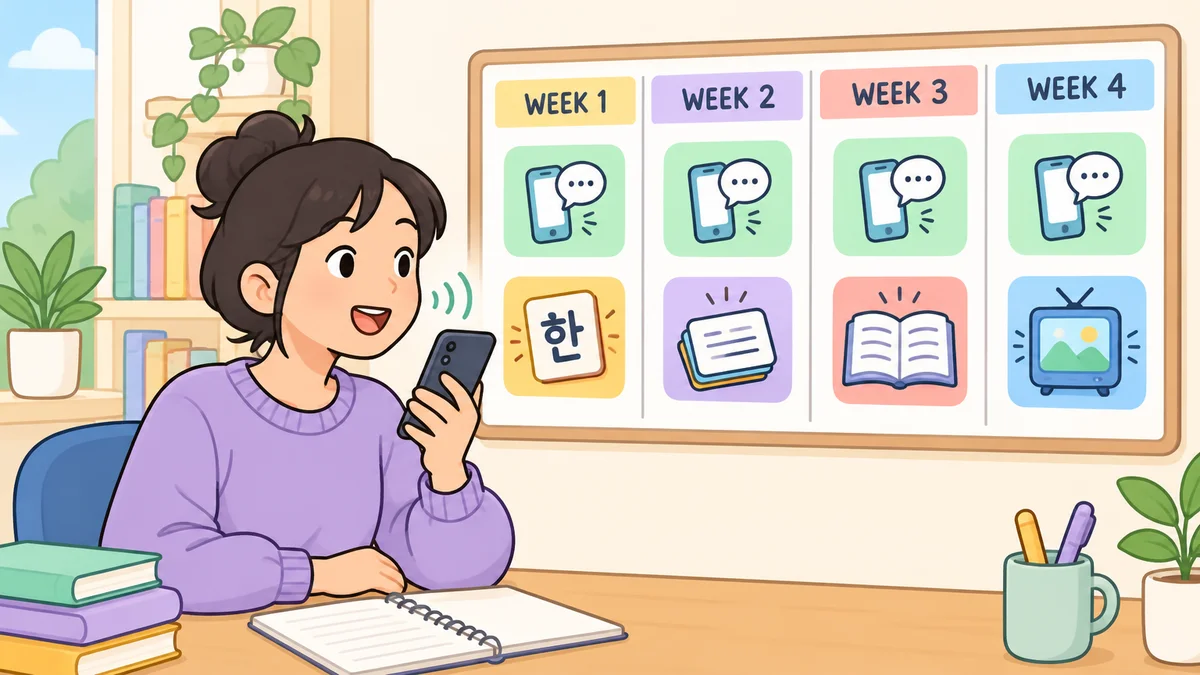
| Week | Teuida, every day | Add this week |
|---|---|---|
| 1 | Days 1 to 7, one a day | Learn Hangul (Duolingo's 한 tab or our Hangul guide) |
| 2 | Days 8 to 14 | Vocabulary in Drops or Anki |
| 3 | Days 15 to 21 | A grammar lesson in Talk To Me In Korean, then say its example sentences out loud |
| 4 | Days 22 to 28 | One episode with Korean subtitles, such as in Lingopie |
Speaking starts on day one, so it never turns into the skill you keep putting off, and the letters you learn in week 1 make the Hangul on screen in Teuida easier to follow.
Mistakes when learning Korean with apps
Only tapping answers. Multiple choice trains you to recognize Korean when you see it, which is a different skill from saying a sentence yourself. If none of your apps asks you to speak, add one that does.
Relying on romanization. Romanized spellings like "annyeonghaseyo" for 안녕하세요 ("hello") help in your first week, but they hide how Korean sounds. Switch to reading Hangul as soon as you can.
Collecting apps. Downloading a new app each time you lose motivation feels like progress, but each one starts you at lesson one again. Pick two, give them a month, then decide.
Skipping speech levels. Korean changes verb endings depending on who you talk to. 감사합니다 (gamsahamnida) and 고마워 (gomawo) both mean "thank you," but the second is for close friends. Check that your app tells you which level a phrase uses.
Where to start
If you install one app this week, make it one that has you speak. You can try Day 1 of the Teuida course for free in the iOS or Android app, or in your browser at teuida.net, and add a second app from this list once speaking is part of your day.


